Tech Tuesday #4 - Multicam Setup
Mar 10, 2026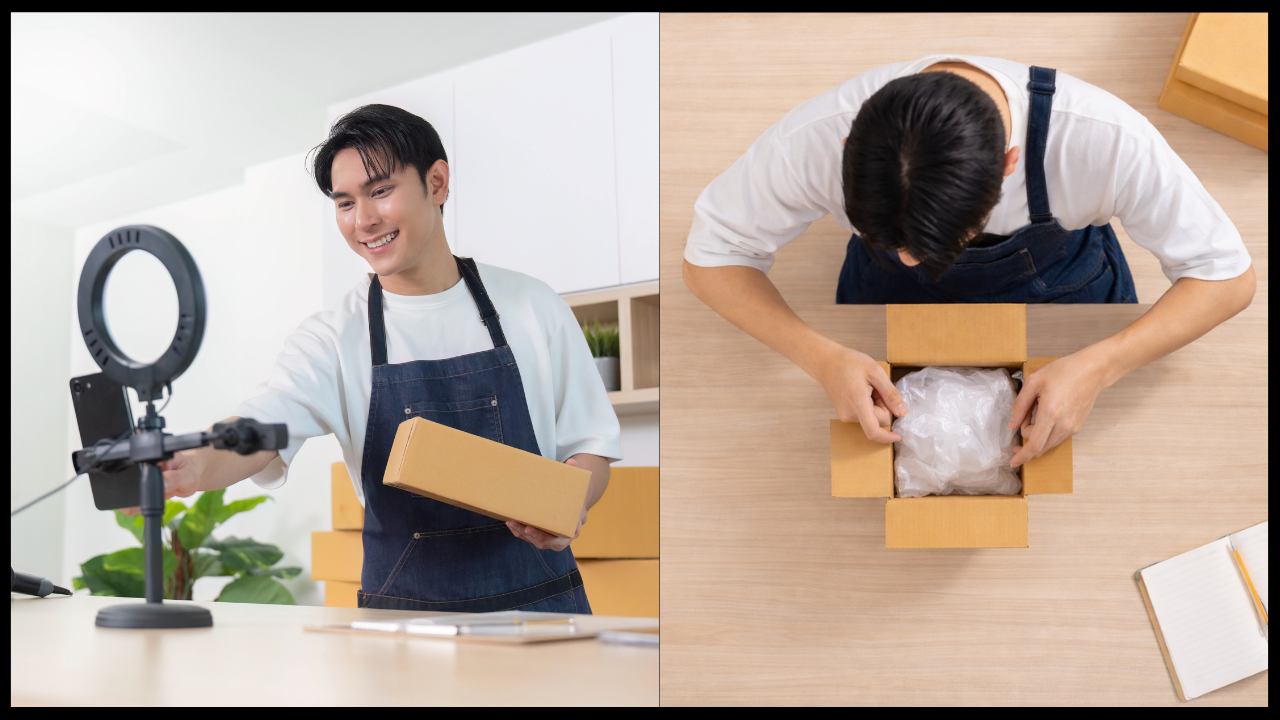
So, you have been Live Streaming now for a bit, you have worked out all the little gremlins with your format, and your Live Streams are running smoothly.
But it’s missing something… A second angle! But what angle?
Now this is a great question to answer as it somewhat depends on your niche and your Live Stream format.
Having a multicam setup adds a significant amount of flavor to a Live Stream. But it comes with a cost, second camera, second capture card, extra scenes need to be created, extra cabling, where and how to mount it, not to mention if you are a one person show you will be the one switching camera views.
For the sake of not falling down a giant rabbit hole, let’s focus on a product presentation format with the second camera being a top down view.
This second camera will need to be mounted securely overhead so as not to be in the main camera shot and not be unstable.
I cannot tell you how often I have seen a live Stream cut to an overhead product shot and the camera view is wiggling. For those sensitive to motion, that will trigger them.
Having the camera mounted on a full cross arm that is supported on both ends or a heavy duty “C” stand is the way to go, as both will have a solid stable mounting point for the second camera and be high enough to be out of the main shot.
This then sets up the question of what lens to use. Each situation will be different, but having a lens with the correct zoom function and F stops for the lighting is important here.
Too high of an F stop and when you zoom the camera in on the product, the lighting will not be correct. Too low of an F stop and just moving the product up or down a little will cause it to go out of focus.
Finding a happy medium here is important to a good overhead shot. Typically an F 2.5’ish will do the trick, but make sure that you set the camera to manual focus. The last thing you want is the overhead camera to be focus hunting every time you move your hand or pick the product up to turn it to a new angle.
Once you have all this setup to your liking in your streaming software, all that is left to do is to do a few practice runs to find when and where the best time is to switch to this new view.
There you have it, not overly difficult.
Until the next installment...
⬇⬇⬇
Stay Connected with News, Updates and Offers from
Live Stream Consultants LLC
Join the Streaminati Mailing List now.
We hate SPAM. We will never sell your information, for any reason.